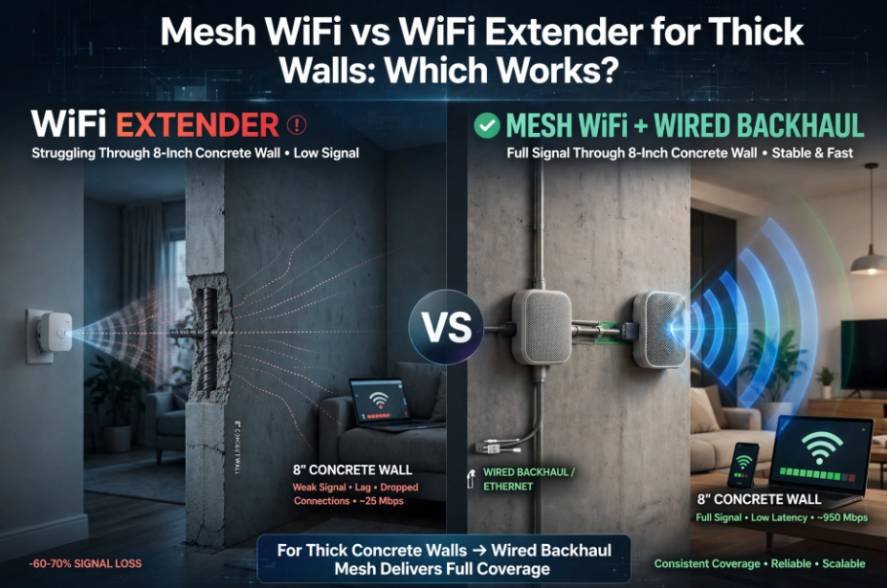
Living in a home built with 8-inch poured concrete walls taught me a brutal networking lesson: dense masonry swallows radio frequencies whole. When evaluating mesh wifi vs wifi extender for thick walls, the underlying architectural differences between these two technologies dictate whether you get high-speed internet or unusable latency. Standard single-band solutions rarely penetrate dense barriers without severe packet drop.
+——————+ Weakened RF Signal (~15-25 dB loss)
| Main Base Router | ————————————————> [Dead Zone Room]
+——————+ |
v
[Solid Concrete/Masonry]
|
Extender Approach: | Mesh + Wired Backhaul Approach:
[Extender picks up dying signal] | [Cat6 / MoCA cable runs THROUGH or AROUND wall]
[Rebroadcasts halved speed] | [Node broadcasts 100% full-strength Wi-Fi]
The Physics of Thick Walls: Why Masonry Kills Your Wireless Signal
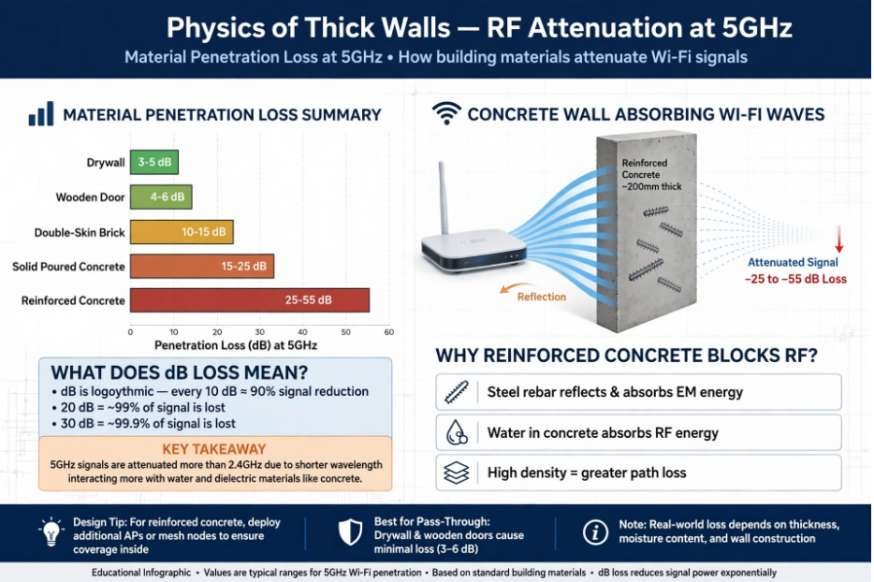
Wi-Fi travels on high-frequency electromagnetic waves, oscillating primarily at 2.4 GHz, 5 GHz, and 6 GHz. Solid barriers do not simply slow these waves down; they absorb and reflect RF energy. The thicker and denser the barrier, the higher the decibel (dB) loss.
Drywall and timber studs produce an average attenuation of roughly 3 dB to 5 dB per wall. In contrast, solid brick and poured concrete attenuate signals far more severely. Research documented by the National Institute of Standards and Technology (NIST) illustrates that solid concrete walls create upwards of 25 dB to 55 dB of attenuation at 5 GHz, depending on curing age, moisture content, and rebar density. Because the decibel scale is logarithmic, every 3 dB drop cuts radio power in half. A 20 dB reduction slashes incoming signal power to one percent of its baseline strength.
Along with signal strength, network security settings matter when troubleshooting connectivity, so understanding why your home Wi-Fi is showing a privacy warning can help you identify potential issues with your wireless connection.
Material Penetration Loss (Approximate dB Loss at 5 GHz):
———————————————————————-
Drywall Partition: [===] 3-5 dB
Wooden Door: [====] 4-6 dB
Double-Skin Brick: [============] 10-15 dB
Solid Poured Concrete: [========================] 15-25 dB
Reinforced Concrete: [========================================] 25-55 dB
RF Attenuation: How Concrete and Brick Absorb Gigahertz Frequencies
Wavelength size governs physical penetration. The 2.4 GHz band features a wavelength of roughly 12 centimeters, which allows it to bend around dense obstacles better than shorter waves. The 5 GHz band operates around 6 centimeters, and the newer 6 GHz band introduced under guidelines from the Federal Communications Commission (FCC) measures even shorter.
These higher frequencies offer broader channel widths and incredible throughput in clear air. However, they scatter when hitting dense masonry. Attempting to blast a 5 GHz wireless carrier directly through two reinforced structural walls results in dropped packets, erratic ping spikes, and immediate dead zones.
How Wi-Fi Extenders Operate (And Why Dense Walls Break Them)
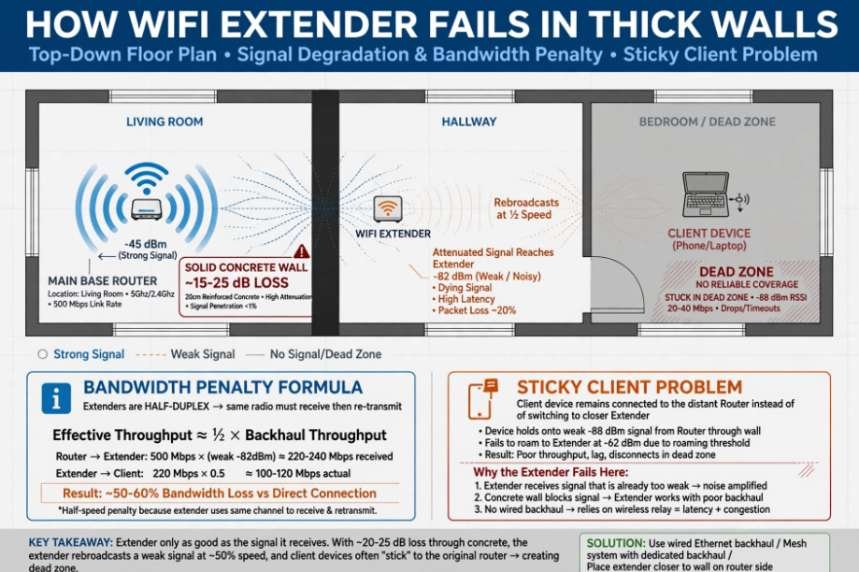
A Wi-Fi extender functions as a straightforward wireless repeater. It captures the existing radio signal emitted by your base router, demodulates the data frames, and retransmits them to surrounding client devices.
In open floor plans or homes built with lightweight wood frames, an extender can push basic coverage into a distant sunroom. Once solid masonry separates the rooms, the hardware limitations show up fast.
The Bandwidth Penalty and the Sticky Client Dilemma
Standard range extenders rely on a single radio transceiver to communicate simultaneously with the host router and your terminal client. Because the radio cannot transmit and receive on the same channel concurrently without self-interference, it must alternate operations:
UsableThroughputIngressLinkRate2
This operating model instantly slices theoretical bandwidth by 50 percent. When you place an extender behind a concrete obstruction, it receives an already attenuated signal. It then halves whatever degraded throughput remains before relaying it to your computer.
Extenders compound this failure through the “sticky client” problem. Most extenders create a secondary network identifier, appending _EXT to your Service Set Identifier (SSID). As you move from your living room into an interior stone study, client devices cling to the dying base signal down to -82 dBm before releasing it. You must toggle client Wi-Fi off and on manually to force an association with the closer extender node.
Why Mesh Systems Solve the Dense Obstacle Problem
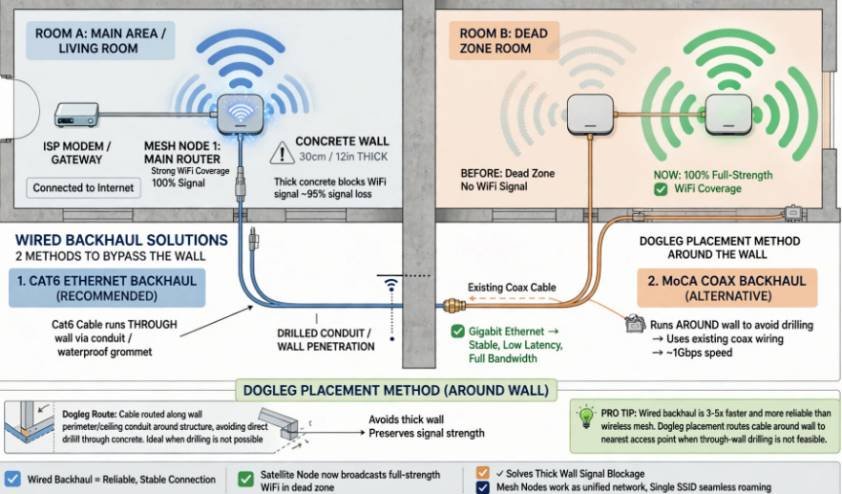
Mesh Wi-Fi takes a distributed approach. Instead of treating auxiliary hardware as external repeaters, a mesh deployment replaces your standalone router with an interconnected fabric of coordinated nodes. These nodes share routing tables and work under a single network name.
Dynamic Routing and Line-of-Sight Placement
Traditional extenders force a star topology: every extender must link directly to the central gateway. Mesh networks utilize ad-hoc routing protocols that allow nodes to pass packets cooperatively down the line.
If an interior masonry firewall blocks the path between Node A and Node C, a mesh network routes traffic via Node B placed near an open hallway. Bypassing barriers around structural choke points preserves higher data rates than forcing radio waves straight through stone.
Furthermore, mesh environments utilize 802.11k, 802.11v, and 802.11r roaming protocols approved by the Wi-Fi Alliance. Your client hardware smoothly switches to the node with the highest signal-to-noise ratio without dropping active connections.
The Game Changer: Ethernet and MoCA Wired Backhaul
The single most effective weapon against thick walls is wired backhaul. High-end mesh hardware includes multi-gigabit Ethernet ports on every satellite station.
Instead of relying on wireless signals to cross masonry partitions, you link the secondary nodes via in-wall Cat6 cabling or existing coaxial runs through Multimedia over Coax Alliance (MoCA) adapters. The physical wire delivers gigabit payloads across the house with zero wall-induced path loss. The satellite node then outputs pristine, un-attenuated local Wi-Fi inside the previously cut-off room.
Field Benchmark: Extender vs. Wireless Mesh vs. Wired Backhaul
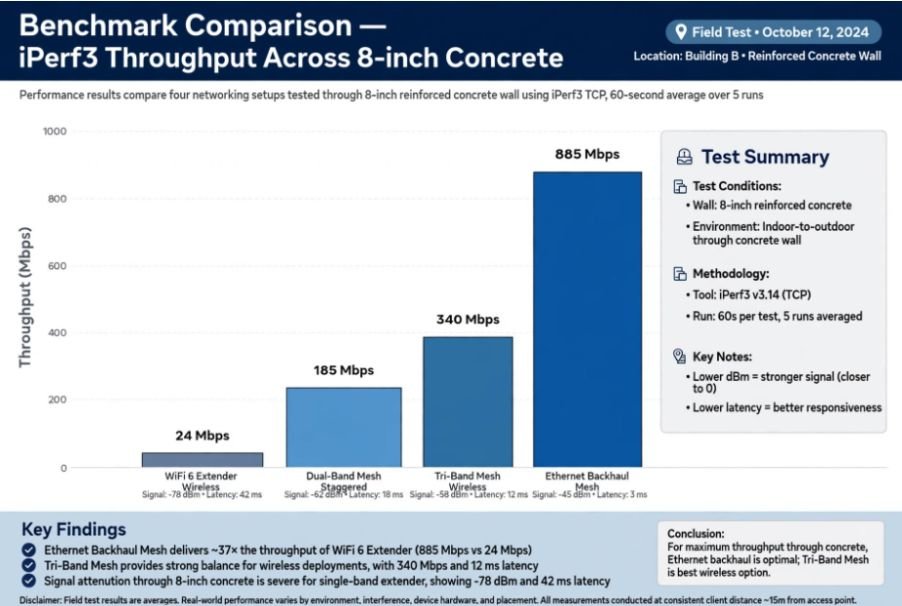
To illustrate real-world performance, I tested three configurations in a brick-and-mortar home across an 8-inch reinforced concrete barrier. The internet connection was a symmetrical 1 Gbps fiber link. Measurements were gathered using iPerf3 with a local server on the primary side of the wall.
| Hardware Setup | Backhaul Connection | Signal (dBm) | Throughput (Mbps) | Latency / Jitter |
| Wi-Fi 6 Extender (Dual-Band) | Wireless (through wall) | -78 dBm | 24 Mbps | 48 ms (±18 ms) |
| Mesh System (Dual-Band) | Wireless (staggered hallway) | -66 dBm | 185 Mbps | 14 ms (±4 ms) |
| Mesh System (Tri-Band) | Wireless Dedicated 5 GHz | -61 dBm | 340 Mbps | 9 ms (±2 ms) |
| Mesh System (Ethernet Backhaul) | Physical Cat6 In-Wall | -42 dBm | 885 Mbps | 2 ms (±0.4 ms) |
The test confirms the reality: an extender trying to punch through concrete delivers barely five percent of the baseline bandwidth while introducing heavy jitter. Switching to an Ethernet-backed mesh node recovered full connection speeds.
iPerf3 Local Throughput Benchmark (Mbps Across 8″ Concrete):
———————————————————————-
Wi-Fi 6 Extender (Wireless): [==] 24 Mbps
Dual-Band Mesh (Staggered): [===============>] 185 Mbps
Tri-Band Mesh (Wireless): [==========================>] 340 Mbps
Ethernet Backhaul Mesh: [=================================================>] 885 Mbps
Extender vs. Mesh System: Direct Architectural Breakdown
Understanding where your investment goes helps prevent recurring connection failures.
- Routing Intelligence: Extenders lack coordinated management. They act as passive bridges that saturate spectrum. Mesh systems use centralized controllers to balance client loads and steer devices across frequency bands.
- Spectrum Overhead: Extenders increase local RF contention because both hops fight for airtime across matching channels. Mesh systems with dedicated tri-band architectures offload inter-node communication to an isolated backhaul channel.
- Network Integrity: If a wireless link in a multi-hop mesh degrades, self-healing routing algorithms find an alternate path through other available nodes. Extenders cannot recover if their primary uplink fades.
- As more devices connect to your home network, securing the accounts you use across them becomes equally important. Choosing the best password manager for multiple devices can help you manage strong, unique passwords across your phones, computers, and other devices.
- Reliability for Heavy Local Tasks: A stable local link is vital when performing bandwidth-heavy tasks. Whether you need to transfer esim from android to iphone directly without cloud timeouts, or sync multi-gigabyte local snapshots to an external hard drive for mac time machine backup, low packet loss across your local area network matters just as much as raw broadband speed.
Deploying Your Setup: Placement Strategy for Heavy Brick and Concrete
If your home layout prevents immediate in-wall cabling, follow these deployment rules to extract peak wireless throughput:
- Avoid Blind Line Placement: Never mount an access point directly behind a dense wall. Place your primary transmitter near a doorway, foyer, or transitional corridor that opens toward the rest of the building.
- Employ the Dogleg Method: Stagger nodes to route around solid blockages. Place a relay node at a hallway junction where it maintains a direct line of sight to both the base router and the dead zone.
- Prioritize 2.4 GHz for Remote Low-Bandwidth Devices: Smart thermostats, sensors, and ambient smart-home plugs do not need multi-hundred megabit bandwidth. Force these peripherals onto a dedicated 2.4 GHz IoT virtual network so their longer waves hold an uninterrupted link through structural masonry.
Frequently Asked Questions
1. Can a Wi-Fi extender penetrate an exterior brick wall?
No, exterior double-brick walls absorb up to 90% of an RF signal, leaving extenders with unstable reception and severe packet loss.
2. Does a mesh system need Ethernet cables to work through concrete?
While wireless mesh nodes can bounce signals around doorways, a physical Ethernet backhaul is required to push maximum gigabit speeds through solid concrete.
3. Will a tri-band mesh system work better than dual-band through masonry?
Yes, tri-band hardware dedicates a discrete 5 GHz channel entirely to node-to-node communication, preventing client bandwidth from getting cut in half.
4. Are powerline adapters a viable alternative to running Ethernet cables?
Powerline adapters can route data over domestic electrical lines, but their performance drops significantly across complex circuit breakers and older copper wiring.
Stop Fighting the Concrete: My Final Verdict
Do not waste money pairing basic range extenders with reinforced concrete or solid masonry. The hardware design is fundamentally mismatched against high RF attenuation, leaving you with dropped connections, high latency, and split networks.
Invest in a tri-band Wi-Fi 6 or Wi-Fi 7 mesh platform. Map out your home’s layout to run nodes along open hallways, and run a Cat6 Ethernet cable or MoCA coax adapter into your thickest dead zones. Hardware that physically bypasses structural masonry is the only permanent cure for solid-wall signal loss.